Compute
Accelerate WRF execution
Move heavy physics-based forecast workloads onto GPU-accelerated infrastructure so runs finish sooner.

AceCAST
AceCAST brings NVIDIA GPU acceleration to Weather Research and Forecasting workflows, helping teams run high-resolution simulations faster while preserving the model detail their decisions depend on.
Core AceCAST performance story for GPU-accelerated WRF workflows.
Built for high-resolution domains where model detail affects decisions.
Weather Research and Forecasting workflows accelerated for production use.
Standard WRF
CPU workflow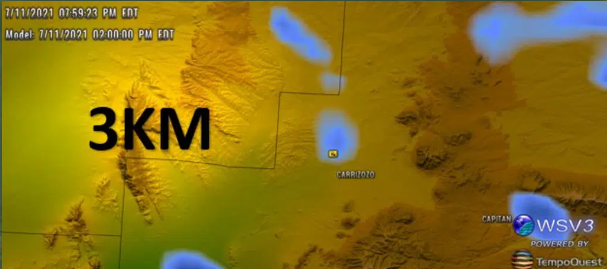
AceCAST GPU
Accelerated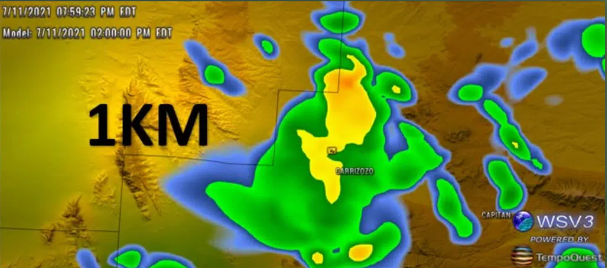
What AceCAST Changes
AceCAST is for teams that already understand the value of physics-based forecasting but need faster turnaround, higher-resolution domains, or more practical production economics than traditional CPU-only runs can support.
Compute
Move heavy physics-based forecast workloads onto GPU-accelerated infrastructure so runs finish sooner.
Resolution
Support high-resolution workflows where spatial detail, timing, and local gradients matter to the user.
Operations
Help forecasting teams refresh outputs, test scenarios, and support recurring decision windows more practically.
Delivery
Turn accelerated forecast output into dashboards, risk scoring, custom datasets, and operational feeds.
Performance Story
AceCAST is not acceleration for its own sake. Faster WRF execution gives teams more room to refresh runs, test configurations, preserve high-resolution detail, and deliver output while it can still change the decision.
Runtime Comparison
CPU to GPU path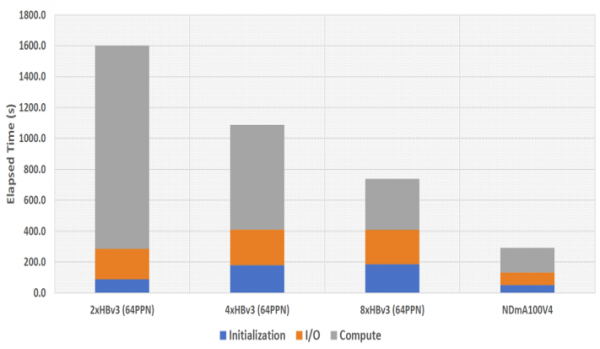
A shorter runtime changes what a forecast team can attempt before the operational deadline arrives.
What changes operationally
9x
Large runtime gains can turn a single slow run into a more practical operating cycle.
GPU
NVIDIA GPU acceleration helps heavy WRF workloads use parallel compute more effectively.
WRF
Teams can focus on domains, physics, cadence, and delivery without abandoning familiar WRF workflows.
Operational Fit
AceCAST supports teams that need physics-based model output to move faster through research, planning, validation, and production delivery.
Renewables
Run higher-resolution forecasts for generation, ramp risk, and operational planning windows.
Forecast Teams
Refresh high-resolution domains faster and support more practical recurring forecast cycles.
Research
Test configurations and cases without waiting through traditional CPU-only turnaround times.
Data Products
Feed custom weather datasets, visual products, risk models, and operational decision systems.
 Client Validation
Veer Renewables evaluated AceCAST against traditional WRF output for wind forecasting. The validation story is not just faster runtime; it is faster runtime with output differences small enough to support real operational analysis.
5x
Speed improvement
Low
Output variance
Wind
Energy focus
Mean Wind Speed Difference
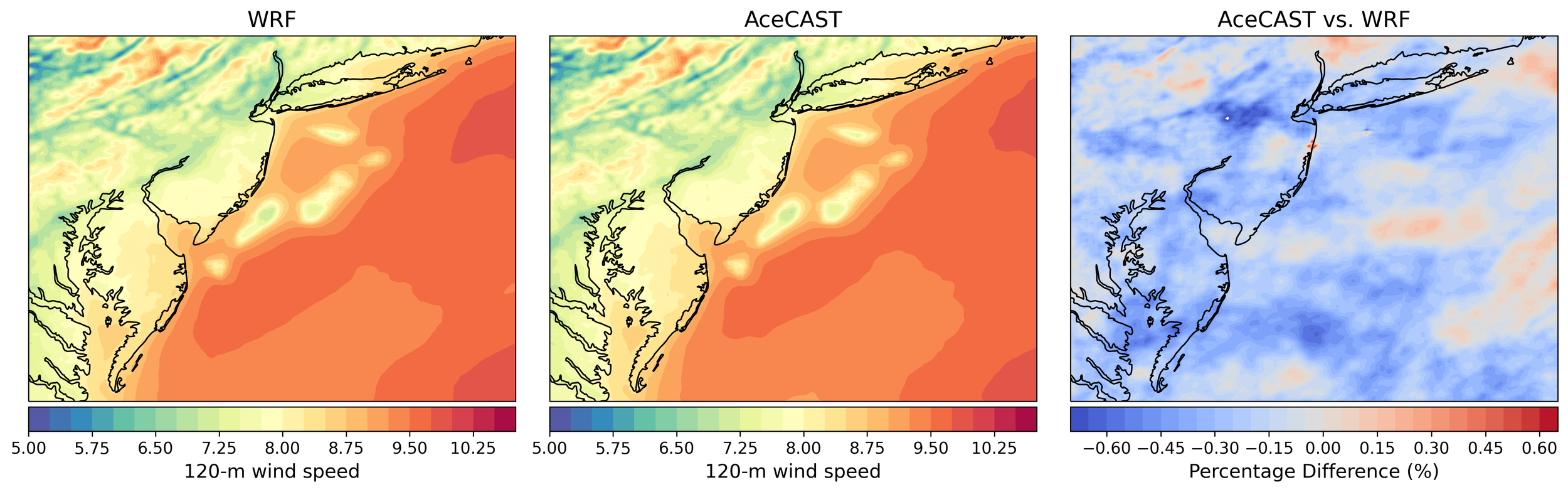
Validation graphic from the Veer Renewables analysis comparing WRF and AceCAST outputs.
Deployment Path
AceCAST conversations usually start with the workflow your team already runs: domain size, physics options, forecast horizon, cadence, hardware, and output needs.
01
Domain, resolution, physics, forecast horizon, cadence, and output requirements define the acceleration target.
02
We identify the right product path: AceCAST acceleration, AceCAST Cloud, or a custom production workflow.
03
Runtime improvements are reviewed alongside forecast-output differences and the decisions they support.
04
Forecast outputs move into the files, APIs, viewers, dashboards, or recurring workflows your team needs.
Evaluate AceCAST
The trial request helps us understand who you are, why AceCAST matters to your work, and how you plan to use it before our team reviews the request.
Trial Request
The request form collects a detailed justification, organization details, intended use case, consultation preference, and the registration fee needed to submit the trial request for review.
Why
Why you are interested in AceCAST and how you plan to use it.
Who
Your name, company email, organization, website, and sector.
Review
Consultation preference, optional notes, and the $10 trial registration fee.